
Разбираем и осматриваемся.
Подключаемся к роутеру. RS-232.
Начинаем общаться с роутером.
Операционная система и ресурсы.
Можно ли временно сохранять файлы в роутере?
Получаем файл с помощью wget.
Локальный сервер.
Перед установкой TFTP сервера.
dd - очень полезная утилита.
Делаем копию сервера.
Устанавливаем TFTP сервер, конфигурируем.
Особенность T-FTP сервера.
Обмениваемся файлами с сервером.
Как было сказано раньше, простоте и минимализму данного роутера можно позавидовать.
Разбираем и осматриваемся.
Три винта и можно видеть что находится в середине.
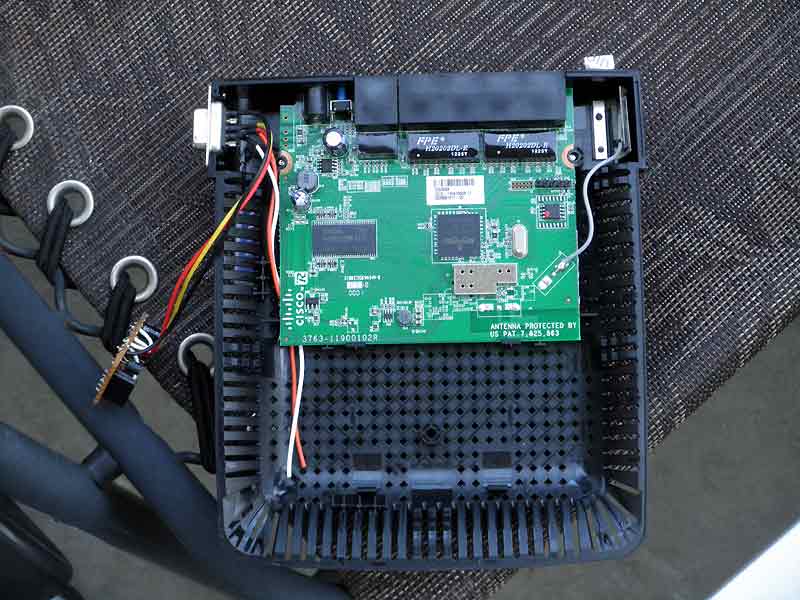
Из важных частей только то, что отмечено на следующей картинке.
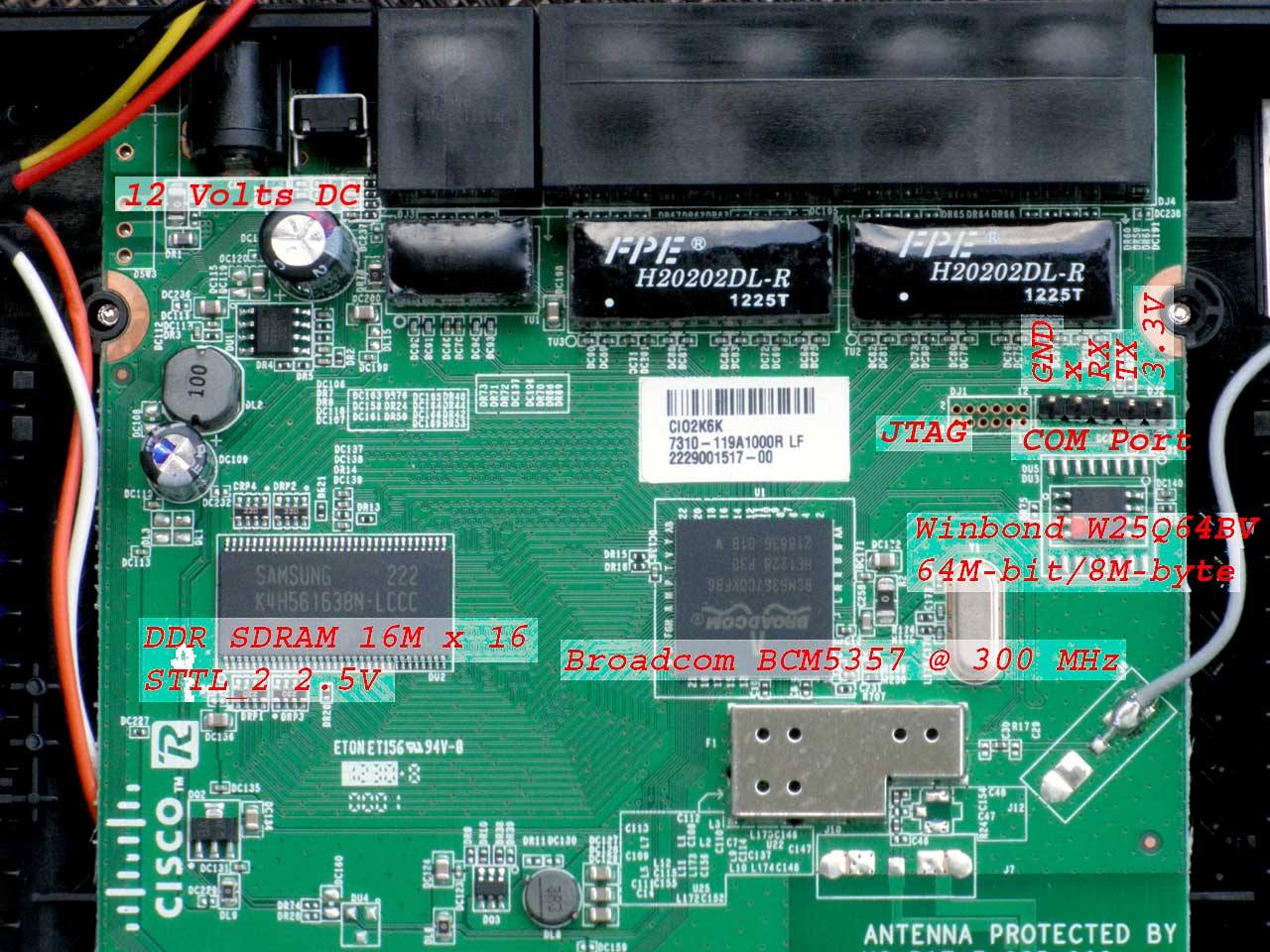
Broadcom BCM5337 это не только процессор. Правильное название - "The Wireless LAN (WLAN) Router System-on-a-Chip (SoC)". То есть все, что было в роутере Linksys BEFW11S4 v.2, теперь на одном кристалле.
Но все эти подробности нас никуда не продвигают. Значительно проще представить Linksys E1200 как "черный ящик" который работает под управлением LINUX. В нем есть JTAG интерфейс для программирования и последовательный порт, предположительно для технологических целей. Если в роутере уже запущен SSH (что под вопросом) то в него можно зайти через сетевой интерфейс, но нужно знать имя и пароль. Последнее весьма проблематично.
Подключаемся к роутеру. RS-232.
Самое простое - последовательный интерфейс. Если разработчик перенаправляет вывод на последовательный порт (я так стараюсь поступать всегда, начиная с загрузки BIOS), то необходимо сконвертировать 3,3 Вольт последовательного порта в роутере в стандартный сигнал для RS-232 и подключить компьютер.
Схема простого конвертора, проверенного десятилетиями, на рисунке ниже. Она работает при любом стечении самых неблагоприятных обстоятельств.
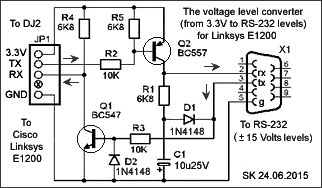
Этот конвертер "живет" прямо на разъеме. Стандартный RS-232 соединитель выведен на левую сторону, подальше от единственной антенны.

На этом "доделки" в роутере заканчиваются и можно смело закрывать крышку.
Последовательного порта, в моем копьютере, не оказалось. Поэтому переходник с USB to RS-232 оказался очень кстати. Остается только выяснить на какой порт "сел" этот адаптер.
Роутер E1200 подсоединенный к компьютеру (Ubuntu 10), с открытым "терминалом" и результатом команыды "dmesg", на фотографии ниже.

Начинаем общаться с роутером.
Дальше без сюрпризов. Запускаем "Serial Port Terminal" или PuTTY (Serial Con.), устанавливаем порт и скорость 115200. Остальное по умолчанию. Жмем "ОК" и мы общаемся с роутером.
На предложение нажать "Enter" роутер отвечает строкой о версии BysyBox и подтверждением того, что мы зашли как "root". Нажимаем "Tab" дважды и получаем список команд, которые доступны.
Hit enter to continue...
BusyBox v1.7.2 (2015-01-07 19:33:00 CST) built-in shell (msh)
Enter 'help' for a list of built-in commands.
#
6rd_nud erase ln ripngd
[ et login rm
[[ expr logread rdir
acs_cli ez-ipupdate ls rmmod
acsd false lsmod rotatelog.sh
addgroup fdisk misc route
adduser fgrep mkdir sendudp
arp filter mkfifo ses_led
basename filtersync mkfs.minix setreg
bpalogin find mknod sh
brctl free monitor_cable sleep
busybox fsck.minix monitor_ipv6 stats
cal gencert.sh more su
cat generate_md5sum mount sulogin
cesmDNS generate_pin msh swapoff
check_all_led generate_ula mv swapon
check_http.sh getreg nas sysctl
check_ps getty nas4not syslogd
check_ses_led gpio_check netbios tail
check_wps_led grep netstat tc
chgrp halt nlinkd telnet
chmod hb_connect ntpclient telnetd
clear hb_disconnect ntpd test
cp head nvram tftp
cron hostid openssl tftpd
cut hotplug passwd top
date hotplug2 ping touch
ddns_checkip hotplug_2 ping6 tracepath6
ddns_error httpd pivot_root traceroute
ddns_success id power_led traceroute6
delgroup ifconfig poweroff true
deluser igmprt ppp_event tzoupdate-1.11
detectwan igmpxmld pppd udevtrigger
df igs pptp umount
dhclient init preinit uname
dhcpd insmod printf upnp
diag_pingbutton ip process_monitor uptime
diag_tracertbutton ip6tables ps usleep
diagwpsbutton ip6tables-restore pwd vconfig
dirname iptables qos wan_auto_detect
disconnected_pppoe iptables-restore qos_bw_detect waninfo
dmesg ipupdated radvd wget
dnsmasq kill rc wl
du killall rdate wl_iocmd
eapd klogd reboot wlconf
echo l2tp-control redial wps_monitor
egrep l2tpd reset write
emf less resetbutton xargs
env listen restore yes
epi_ttcp lld2d ripd zebra
#
Операционная система и ресурсы
Немного услилий и можно получить информацию о системе (в основном читая содержимое файловов в директории /proc ).
# ksjhdfkshd
ksjhdfkshd:
not found
# uname
Linux
# id
uid=0(root)
gid=0
# pwd
/
# ls
bin dev etc
lib mnt proc sbin sys tmp usr var www
# cd proc/
# ls
1
43 execdomains partitions
2
44 filesystems self
24
45 fs slabinfo
264
485 hnd_proc stat
3
490 interrupts swaps
323
5 iomem sys
324 554
ioports
sysrq-trigger
327
634 irq sysvipc
331
646 kallsyms tblock_proc
336
66 kcore timer_list
338
buddyinfo
kmsg
tty
343
bus loadavg unblock_proc
396
cmdline
locks uptime
399
cp0 meminfo version
4
cpuinfo
misc vmstat
403
crypto modules wl_warning_page
42
devices mounts zoneinfo
422
diskstats
mtd
424
driver net
# cat version
Linux version 2.6.22 (lyb@fedora10) (gcc version 4.2.3) #21 Wed Jan 7 19:18:48 CST 2015
# cat cpuinfo
system type : Broadcom BCMD144 chip rev 1
processor : 0
cpu
model : MIPS 74K V4.9
BogoMIPS : 149.50
………cut…………
# cat meminfo
MemTotal: 28136 kB
MemFree: 3492 kB
Buffers:
1924 kB
Cached:
6712 kB
SwapCached: 0 kB
Active:
6768 kB
Inactive:
5472 kB
………cut…………
# cat mounts
rootfs / rootfs rw 0 0
/dev/root / squashfs ro 0 0
devfs
/dev tmpfs rw 0 0
sysfs
/sys sysfs rw 0 0
proc /proc proc rw 0 0
ramfs /tmp ramfs rw
0 0
devpts
/dev/pts devpts rw 0 0
# df -h
Filesystem Size Used Available Use% Mounted on
/dev/mtdblock2 6.1M 6.1M 0 100% /
devfs 13.7M 0
13.7M 0% /dev
# cat mtd
dev:
size erasesize name
mtd0: 00040000 00010000 "boot"
mtd1: 007b0000 00010000 "linux"
mtd2: 006600c8 00010000 "rootfs"
mtd3: 00010000 00010000
"nvram"
# nvram
usage: nvram [get name] [set
name=value] [unset name] [show] [commit] ...
# nvram show
wl_radius_port=1812
filter_dport_grp3=
get_wsc_pin_index=1
wsc_steps=0
wl1_wme=on
filter_dport_grp4=
wl0_default_ssid=Linksys19884
………cut…………
# ps
PID Uid VSZ Stat Command
1
root 3380 S /sbin/preinit
2
root SW< [kthreadd]
3
root SW< [ksoftirqd/0]
4
root SW< [events/0]
5
root SW< [khelper]
24
root SW< [kblockd/0]
42
root SW [pdflush]
43
root SW [pdflush]
44
root SW< [kswapd0]
45
root SW< [aio/0]
66
root SW< [mtdblockd]
264
root 3368 S resetbutton
323
root 2448 S tftpd -s /tmp -c -l -P E150
324
root 2176 S cron
327
root 6796 S httpd
331
root 2284 S dnsmasq -R -h -i br0 -c 0 -r /tmp/resolv.conf
336
root 1028 S cesmDNS -o /tmp/.mdns_host_info -d -h
Linksys19884 -l
338
root 6944 S dhcpd -cf /tmp/dhcpd-br0.conf -lf /tmp/dhcpd.leases -
343
root 3084 S upnp -D -W vlan2
396
root 2192 S /bin/eapd
399
root 2584 S nas
403
root 3776 S /bin/wps_monitor
422
root 2244 S /usr/sbin/acsd
424
root 2160 S
netbios /tmp/samba/lib/netbios.conf
485
root 1440 S /usr/sbin/lld2d br0
490
root 2812 S /sbin/monitor_cable
554
root 1776 S /bin/sh
555
root 1684 R ps
# top
Mem:
23720K used, 4416K free, 0K shrd, 2236K buff,
8092K cached
CPU: 0.0% usr 0.1% sys 0.0% nice
97.8% idle 0.0% io 0.1% irq 1.7% softirq
Load average: 0.05
0.05
0.01
PID PPID
USER STAT VSZ
%MEM %CPU COMMAND
585 554 root R
1684 5.9 0.2 top
338 1 root S
6944 24.6 0.0 dhcpd
-cf /tmp/dhcpd-br0.conf -lf
/tm
327 1 root S
6796 24.1 0.0 httpd
403 1 root S
3776 13.4 0.0 /bin/wps_monitor
1 0 root S
3380 12.0 0.0 /sbin/preinit
264 1 root S
3368 11.9 0.0 resetbutton
343 1 root S
3084 10.9 0.0 upnp
-D -W vlan2
490 1 root S
2812 9.9 0.0 /sbin/monitor_cable
399 1 root S
2584 9.1 0.0 nas
323 1 root
S 2448
8.7 0.0 tftpd
-s /tmp -c -l -P E150
331 1 root S
2284 8.1 0.0 dnsmasq -R -h -i br0 -c 0 -r /tmp/res
422 1 root S
2244 7.9 0.0 /usr/sbin/acsd
396 1 root S
2192 7.7 0.0 /bin/eapd
324 1 root S
2176 7.7 0.0 cron
424 1 root S
2160 7.6 0.0 netbios /tmp/samba/lib/netbios.conf
554 1 root S
1780 6.3 0.0 /bin/sh
485 1 root S
1440 5.1 0.0 /usr/sbin/lld2d br0
336 1 root S
1028 3.6 0.0 cesmDNS -o /tmp/.mdns_host_info -d -h
66 2 root SW< 0
0.0 0.0
[mtdblockd]
5 2 root SW< 0
0.0 0.0
[khelper]
Из неприятных моментов то, что после выключения питания работа роутера начинается "с чистого листа". За исключением утилиты "nvram", которая позволяет создавать переменные, присваивать им значения и сохранять в энергонезависимой памяти. После включения питания они будут доступны.
Можно ли временно сохранять файлы в роутере?
Читать содержимое текстовых файлов мы уже можем (cat, more, tail). А вот с записью файлов не все так просто.
Не смотря на то, что мы заходим как ROOT, возможности ограничены несколькими директориями.
# chmod -R 777 bin dev etc lib mnt proc sbin sys tmp usr
var www
chmod:
bin: Read-only file system
chmod:
etc: Read-only file system
chmod:
lib: Read-only file system
chmod: mnt: Read-only file system
chmod: sbin: Read-only file system
chmod: usr: Read-only file system
chmod:
www: Read-only file system
------------cut--------------
# reboot
------------cut--------------
Получаем файл с помощью wget.
Утилита ' wget ' позволяет загрузить файл в роутер. Для этого необходим сервер, который файлы раздаёт и директория с возможностью записи, в которой этот файл можно сохранить.
Google, в качестве файл-сервера, нам подойдёт. В директории /tmp создадим поддиректорию ' sk ' и сохраним в ней файл ' index.html ' с первой страницы гугла.
# ls
bin dev etc lib mnt proc sbin sys tmp usr
var www
# mkdir /tmp/sk
# cd /tmp/sk
# ping google.com
PING google.com (74.125.226.65): 56 data bytes
64 bytes from 74.125.226.65: icmp_seq=0
ttl=54 time=40.4 ms
----------cut-----------
# wget http://74.125.226.65
Connecting to 74.125.226.65 (74.125.226.65:80)
index.html 100% |*******************************|
17792 --:--:-- ETA
# pwd
/tmp/sk
# ls
index.html
# ls -l
-rw-r--r-- 1 root 0 17792
Jun 1 17:38 index.html
# more index.html
.doctype html..html itemscope="" itemtype=http:..schema.org/WebPage lang="en"..head..meta
content=..images.google_favicon_128.png. itemprop="image"..title.Google..title..script..function...window.google..kEI:…
----------cut-----------
С чужого сервера файл мы уже загрузили. Теперь можно попробовать это сделать с локального сервера.
Локальный сервер.
Главная проблема загрузки с локального сервера заключается в его отсутствии. Но любой компьютер, с сетевым интерфейсом, может это исправить.
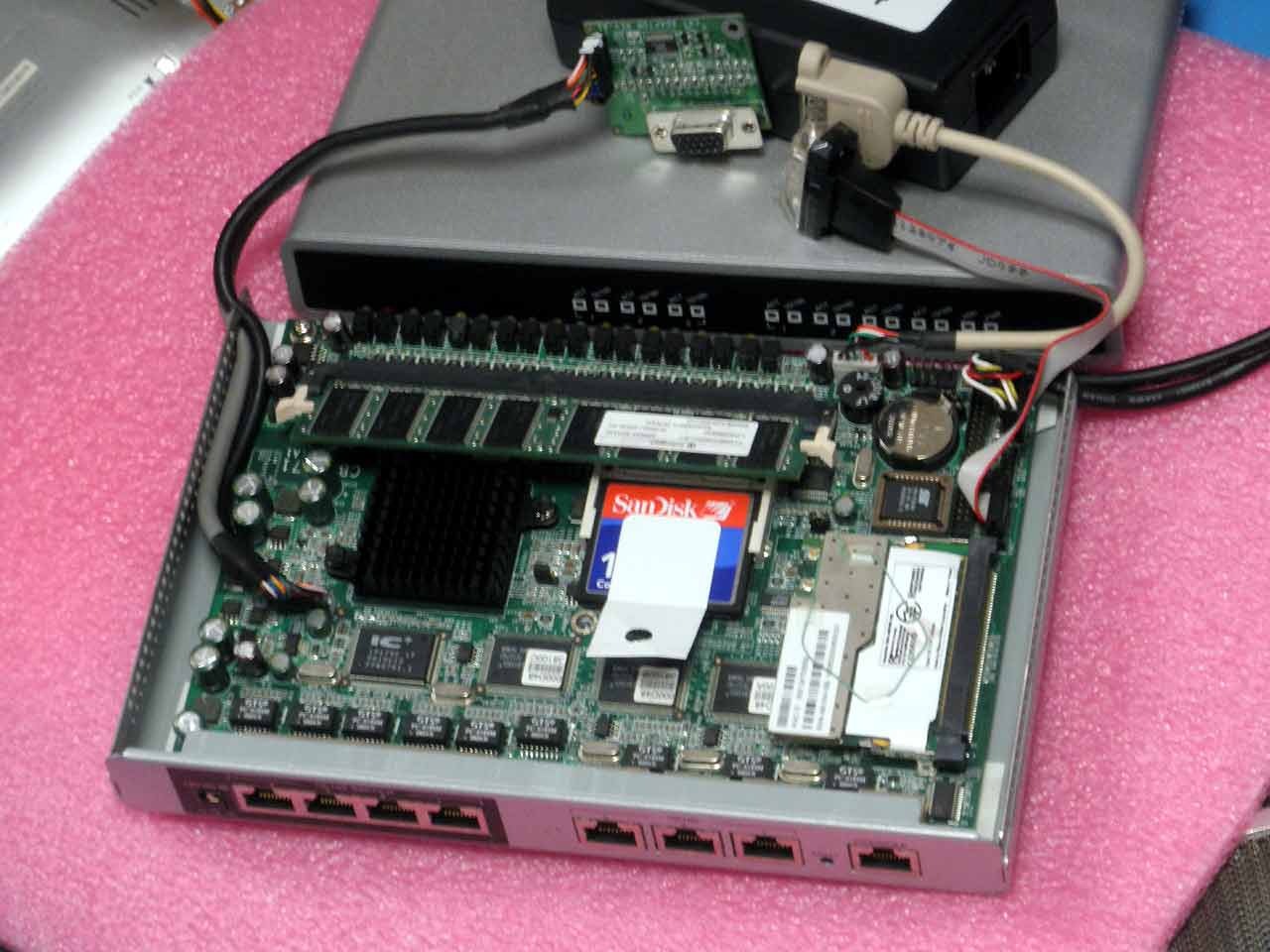
В качестве временного компьютера, выполняющего роль локального сервера, выбран SCB-6971 (Desktop AMD® Geode™ LX800 Network System, 1Gb CF Card, 1Gb RAM, 4 x 10/100 LAN, Mini PCI), в котором живёт Ubuntu 10.04.
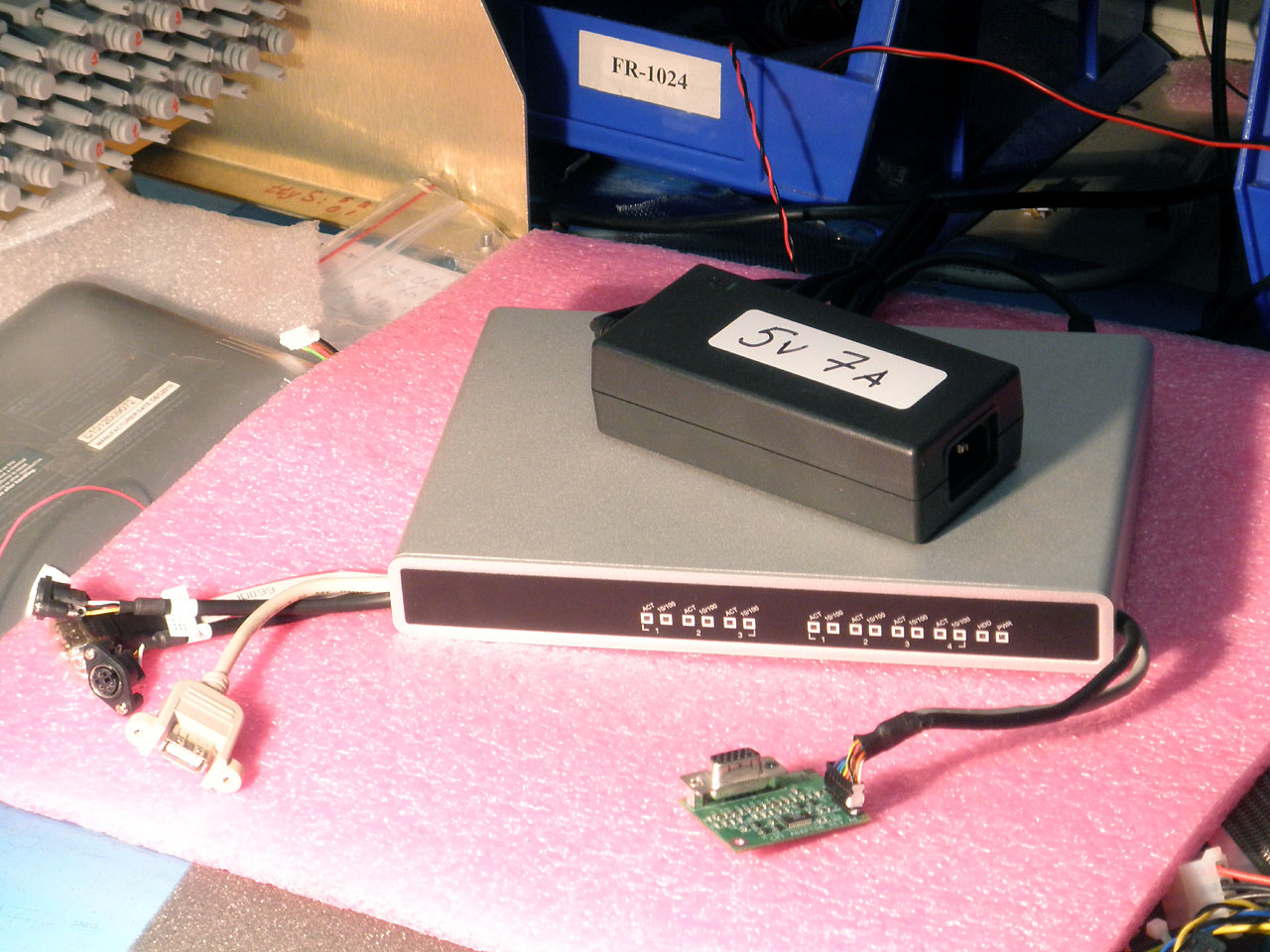
Перед установкой TFTP сервера.
После установки сервера могут возникнуть всякие сюрпризы, после которых прийдется переустанавливать Ubuntu. А это процесс долгий и этого хотелось бы избежать. Поэтому неплохо бы сделать BackUp copy системы.
Избегая сложных и продвинутых программных средств, будем использовать dd , которая присутвует в любом Линуксе.
dd - очень полезная утилита.
dd - одна из самых старых и простых утилит. Она делает точную копию хардрайва. Если бы в системе было бы два одинаковых хардрайва sda и sdb , то после dd if = /dev/sda of = /dev/sdb оба хардрайва стали бы идентичными.
Первая неприятность связана с тем, что если на первом хардрайве есть плохие кластеры , которые прочитаны с ошибкой (а они есть всегда), то dd останавливается. conv=sync,noerror позволяет этого избежать. При этом блок пропускается, а программа переходит к копированию следующего блока.
Вторая неприятность в том, что по умолчанию, копирование происходит блоками по 512 байт. Это делает копирование очнь медленным (1, 2, 10 часов ...). bs=64K увеличивает размер блока до 64 Кбайт, что сильно ускоряет процесс.
Третья неприятность заключаетс в том, что dd не выводит никакой информации о состоянии копирования. Косвенно наблюдать за работой dd можно открыв top процессов в отдельном окне и следить за загрузкой процессора.
В более современных программах (*ddrescue, *dd_rescue) эти неприятности устранены.
ddrescue -f /dev/sda /dev/sdb any_logfile делает то же самое, только выводит дополнительную информацию о состоянии копирования. Опция -f разрешает переписать содержимое /dev/sdb.
Делаем копию сервера.
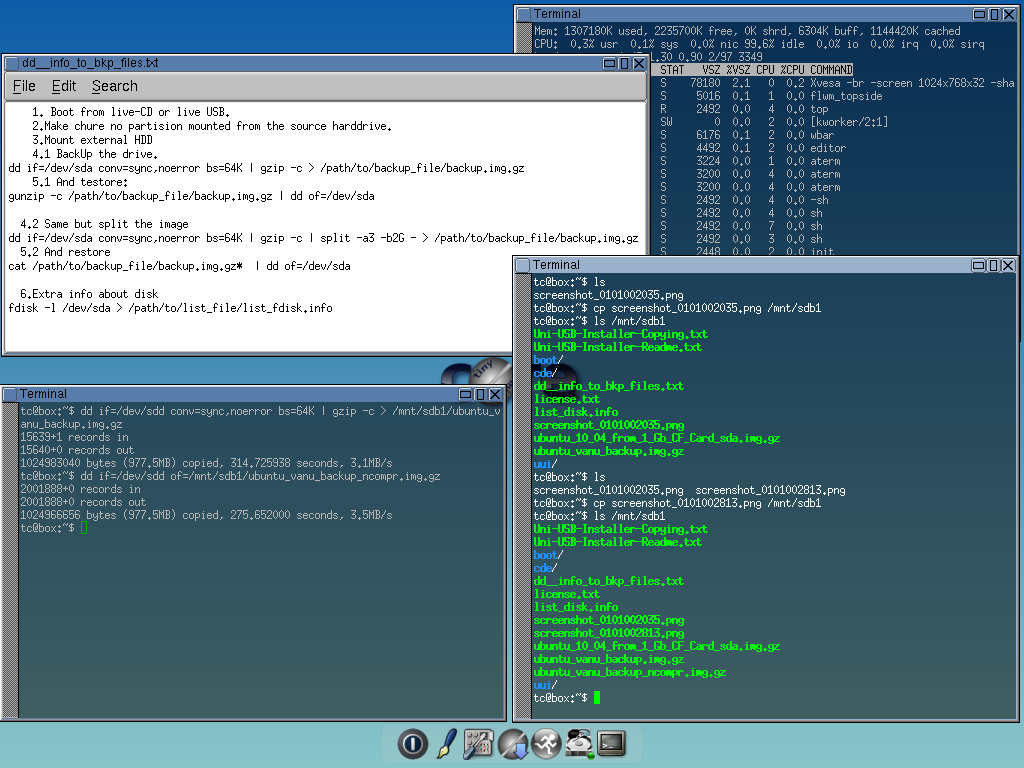
Обычная схема: загружаемся с Live-CD (Live-USB drive, TinyCore Linux ), umount харддрайв, информацию с которого нужно сохранить (CF card (sdd ), в данном случае), делаем полную копию харддрайва (sdd) с помощью dd и сохраняем ее на USB Flash Drive (sdb1 ) с которого загрузилась TinyCore Linux. Что бы сохранить немного места, прижимаем результат архиватором gzip. Если есть место, то последнего не делаем.
1. Boot from live-CD or live-USB.
2.Make sure no partition mounted from
the source hard drive.
3.Mount external HDD
4.1 BackUp the drive.
dd if=/dev/sda conv=sync,noerror bs=64K | gzip -c > /path/to/backup_file/backup.img.gz
5.1 And restore:
gunzip -c /path/to/backup_file/backup.img.gz | dd of=/dev/sda
4.2 Same, but split the image
dd if=/dev/sda conv=sync,noerror bs=64K | gzip -c | split -a3 -b2G - > /path/to/backup_file/backup.img.gz
5.2 And restore
cat /path/to/backup_file/backup.img.gz* | dd of=/dev/sda
6.Extra info about disk
fdisk -l /dev/sda > /path/to/list_file/list_fdisk.info
Устанавливаем TFTP сервер, конфигурируем.
После загрузки Ubuntu 10.04, открываем терминал и в командной строке делаем следующее (красным выделено то, что нужно набрать руками).
*Если коротко, то мы делам следующее: загружаем xinetd (инициализация), tftpd (управление), tftp (обмен файлами по сети) из on-line депозитория, вручную пишем конфигурационный файл (/etc/xinetd.d/tftp) и перезапускаем сервер. В конце запрашиваем и получаем файл хранящийся на сервере и убеждаемся, что он появился в новой директории.
//Убеждаемся,
что
компьютер
подключен к
и-нету//
//Получаем
и
устанавливаем
xinetd,tftpd и tftp//
root@SK:/#
apt-get install xinetd tftpd tftp
//Создаем
пустой файл конфигурации//
root@SK:/#
touch /etc/xinetd.d/tftp
//Редактируем
в nano//
root@SK:/#
nano /etc/xinetd.d/tftp
//Содержание
конфигурационного
файла//
service tftp
{
protocol = udp
port = 69
socket_type = dgram
wait = yes
user = nobody
server = /usr/sbin/in.tftpd
server_args = -s /tftp_files
disable
= no
}
//конец
файла,
сохраняем,
выходим//
//Создаем
пустую
дирректорию,
в которой
будут
находится
файлы для
обмена//
root@SK:/#
mkdir /tftp_files
//Создаем
пустой файл,
который
будем пересылать//
root@SK:/#
touch test_tftp_pass
//читать,
менять и
исполнять
разрешено
всем и все,
что
находится в
этой
директории//
root@SK:/#
chmod -R 777 /tftp_files
//Меняем
владельца
дирректории
и файлов в ней
на
"nobody", группу
на "nogroup"//
root@SK:/#
chown -R nobody:nogroup /tftp_files
//Перезапускаем
tftp сервис//
root@SK:/#
/etc/init.d/xinetd stop
root@SK:/#
/etc/init.d/xinetd start
//Тестируем
TFTP сервер. ‘localhost’
в качестве
адреса.
Создаем
директорию /tftp_files/sk и
загружаем
туда
файл
test_tftp_pass из
директории /tftp_files //
root@SK:/#
cd /tftp_files
root@SK:/tftp_files# ls
test_tftp_pass
root@SK:/tftp_files# mkdir sk
root@SK:/tftp_files# cd sk
root@SK:/tftp_files/sk# ls
root@SK:/tftp_files/sk# tftp
localhost
tftp>
get test_tftp_pass
tftp>
q
root@SK:/tftp_files/sk# ls
test_tftp_pass
root@SK:/tftp_files/sk#
Особенность T-FTP сервера.
Вы можете брать файлы из директории, которая прописана в конфигурации сервера. В данном случае это директория /tftp_files, с опцией -s. Нужно знать, только, имя файла и IP адрес сервера. Имени и пароля не требуется. В сети, 69-й порт должен быть открыт для udp , так как через него сервер получает первый запрос на общение.
А вот с записью файлов с удаленного компьютера, в эту директорию, есть некоторая проблема. TFTP не может создавать новые файлы на сервере. Он может, ТОЛЬКО, ПЕРЕПИСЫВАТЬ СОДЕРЖИМОЕ ФАЙЛОВ, имена которых уже существуют на сервере (и только в директории /tftp_files, в данном случае) . Последнее он может делать без ограничений.
Никаких средств, для того, что бы заглянуть и посмотреть какие файлы уже есть на сервере, в TFTP нет. Если кто то создал файл, скажем list_of_files_on_my_tftp_server.txt, list.txt или index.txt, то его можно получить и прочитать с помощью cat или more.
Обмениваемся файлами с сервером.
Что бы получить файл нужно знать две вещи: имя файла, который мы хотим получить и IP адрес TFTP сервера.
Что бы передать файл на сервер - имя файла, который мы хотим передать и IP адрес TFTP сервера.
* TFTP клиент на роутере, который является частью BusyBox, имеет другой синтаксис команд. Запуск tftp с несущесвующей опцией ( -h , к примеру) возвращает короткий help .
On
the LinkSys E1200 side (IP 192.168.1.114*):
#
pwd
/tmp
#
cd wtftp/
#
ls
#
tftp -h
tftp: invalid option -- h
BusyBox v1.7.2 (2015-01-07 19:33:00 CST) …
Usage:
tftp [OPTION]... HOST [PORT]
Transfer
a file from/to tftp server using "octet"
mode
Options:
-l FILE Local FILE
-r FILE Remote FILE
-g
Get file
-p
Put file
#
tftp -g -r scr_tftp.txt 192.168.1.112
#
tftp -g -r test_f 192.168.1.112
#
tftp -g -r test_tftp_pass 192.168.1.112
#
#
tftp -p -l test_tftp_pass 192.168.1.112
#
tftp -p -l test_f 192.168.1.112
#
tftp -p -l scr_tftp.txt
192.168.1.112
tftp: server error: (2) Access violation
#
#
ls -l
-rw-r--r-- 1
root 0
324 … scr_tftp.txt
-rw-r--r-- 1
root 0
78 … test_f
-rw-r--r-- 1
root 0
241 … test_tftp_pass
#
#
tftp -p -l abcd.efg 192.168.1.112
tftp: can't open 'abcd.efg': No such file or directory
#
touch abcd.efg
#
tftp -p -l abcd.efg 192.168.1.112
tftp: server error: (2) Access violation
#
On
the TFTP-SERVER side (IP 192.168.1.112):
root@SK:/tftp_files# cat /etc/xinetd.d/tftp
service tftp
{
protocol = udp
port = 69
socket_type = dgram
wait = yes
user = nobody
server = /usr/sbin/in.tftpd
server_args = -s /tftp_files
disable = no
}
root@SK:/tftp_files# pwd
/tftp_files
root@SK:/tftp_files# ls
-l
total
12
-rw-r--r-- 1 root root 324 … scr_tftp.txt
-rw-rw-rw- 1 root root 78 … test_f
-rwxrwxrwx 1 nobody nogroup 241 … test_tftp_pass
root@SK:/tftp_files#
Файл scr_tftp.txt передать обратно не удалось, так как на сервере он только для чтения (для всех, кроме root). Если поменять атрибуты, к примеру chmod 777 scr_tftp.txt то файл будет принят сервером.
Файл abcd.efg так же не может быть принят сервером, так как там не сущесвует файла с таким именем.
... окончание ...
Как результат, мы имеем роутер и компьютер под управлением Линукс. Идеальная машина для изучения Linux и работы в командной строке. Низкая нагрузка на процессор (97.8% idle) позволяет "навесить" на этот роутер дополнительные программы и скрипты. Как это сделать и для чего это нужно - это уже другой вопрос.
SK 25.06.2015